n8n on Kubernetes: Reference Architecture for High Availability
Running n8n on Docker Compose is easy. Scaling it on Kubernetes without losing executions is a different story. Discover the reference architecture that separates testing environments from resilient enterprise operations.
There is a famous world saying: "Hope is not a strategy."
Many companies start using n8n on a simple EC2 instance or a Droplet, running via Docker Compose with the default SQLite database. It works wonderfully... until it doesn't.
The problem usually arises in the same way: a traffic spike on Black Friday, a poorly optimized workflow consuming all available RAM, or a lock on the SQLite database that corrupts the execution file. The server crashes, n8n restarts, and you've lost critical data.
If n8n has become mission-critical for your business, you need to stop treating it like a script and start treating it like a distributed application. Let's talk about how to architect this on Kubernetes.
Goodbye Monolith: Understanding Queue Mode
The official n8n documentation is clear, but often ignored: for scale, you must migrate to Queue Mode.
In standard Docker Compose, n8n is a monolith. It receives the webhook, processes the logic, and writes to the database. If the processing hangs, the webhook fails.
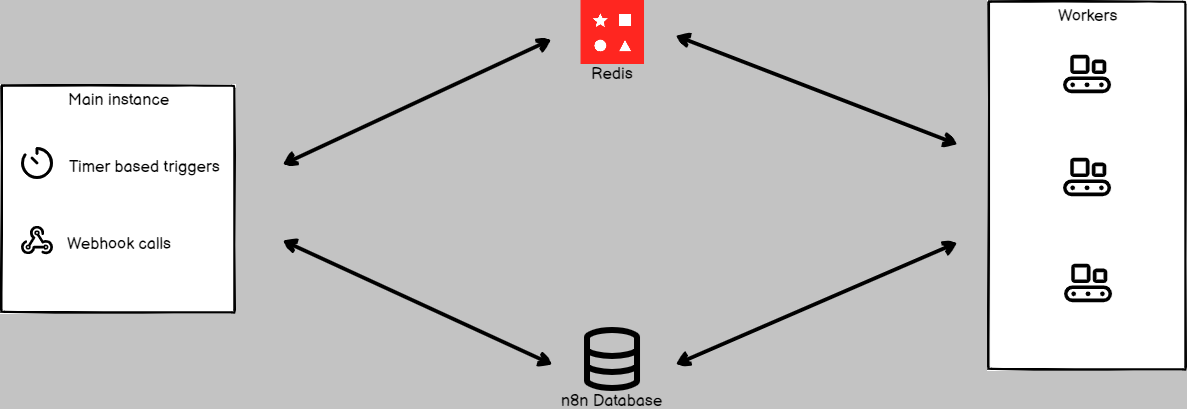
In a High Availability (HA) architecture on Kubernetes, we decouple these functions following modern methodologies, such as The Twelve-Factor App principles. The reference architecture we implement at n8nscale divides n8n into three vital components:
- Main/Editor Pod: Serves only the User Interface (UI) and the management API. If it crashes, your workflows keep running.
- Webhook Scalers: Lightweight pods focused solely on receiving HTTP requests and quickly pushing them to Redis. They scale horizontally with ease to handle thousands of requests per second.
- Workers: The heavy lifters. They read messages from Redis and execute the hard work.
The Heart of Resilience: Redis and PostgreSQL
Forget SQLite. In a clustered environment, trying to use SQLite is asking for data corruption (even with persistent volumes, database locking will betray you).
A robust architecture requires:
- PostgreSQL: To store execution history, credentials, and workflow definitions. Use managed services (like Amazon RDS or Azure SQL) to ensure backups and automatic failover.
- Redis: Acts as the message broker. It ensures that if a Worker dies mid-process, the message isn't lost (depending on persistence settings) or, at the very least, decouples ingestion from processing.
The Binary Data Challenge
Here is the "gotcha" that catches many engineers off guard when migrating to Kubernetes. By default, n8n saves binary files (that PDF you downloaded in the workflow) to the local disk.
If the Webhook Pod downloads the file and the Worker Pod tries to process it, the Worker will fail because the file isn't on its disk.
There are two solutions, but only one is recommended for Cloud Native:
- Shared Volumes (NFS/EFS): It works, but it's slow and can cause I/O bottlenecks.
- Object Storage (S3/Azure Blob): The correct solution. Configure n8n to externalize binary storage directly to an S3 bucket. This makes your pods stateless, allowing them to die and respawn without losing data.
Intelligent Autoscaling with KEDA
It's not enough to define replicas: 3 in your deployment. The true power of Kubernetes shines when we use KEDA (Kubernetes Event-driven Autoscaling).
Instead of scaling your Workers based solely on CPU usage (which is reactive and slow), we configure KEDA to monitor the Redis list.
- Empty list? Scale down to 1 (or 0) workers to save money.
- 1,000 items in the queue? KEDA instantly spins up 20, 50, 100 workers to process the backlog and then kills the pods when the work is done.
Conclusion
Migrating n8n to Kubernetes isn't just a "Lift and Shift." It's a mindset shift from single-server to distributed systems.
This architecture eliminates single points of failure, ensures that traffic spikes don't bring down your operation, and allows for zero-downtime updates.
Sound complex? That's because it is. If your team needs to focus on business logic rather than configuring Ingress Controllers, Redis Sentinels, and YAML manifests, n8nscale can implement this reference architecture in your cloud. Let's talk?
Kommentare
Melde dich an oder registriere dich, um diesen Artikel zu kommentieren.
Noch keine Kommentare. Sei der Erste!